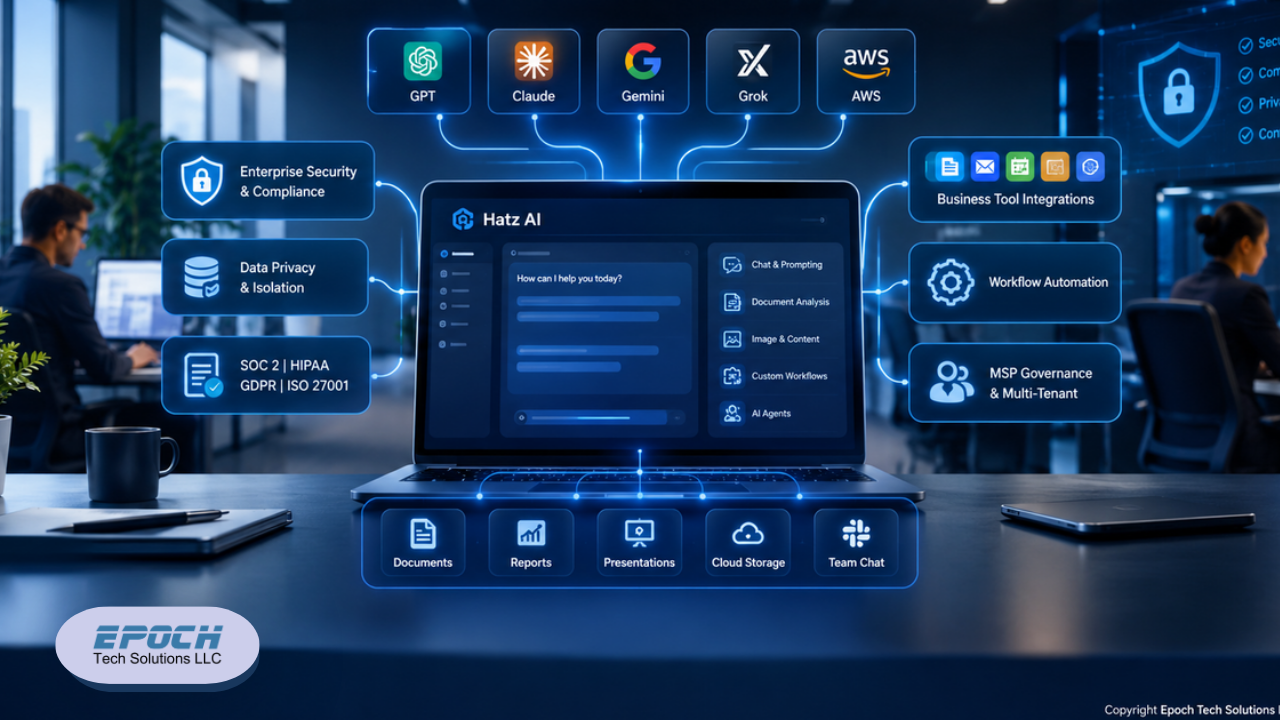
Hatz AI: Secure Multi-Model AI for SMBs and MSPs
Discover how Hatz AI helps SMBs and MSPs securely use multiple AI models, automate workflows, integrate business tools, and manage AI governance.


Managing multiple clients, deadlines, and deliverables without the right tools is a recipe for burnout. Does your team rely on email chains and spreadsheets to track project progress? There's a better way, and it doesn't require an enterprise-level budget.
Zoho Projects is a cloud-based project management software built for professionals who need structure, visibility, and efficiency. From solo consultants to growing agencies, this platform gives teams the tools to plan smarter, communicate faster, and bill more accurately. In this post, you'll learn exactly what Zoho Projects offers, how to maximize its features, and whether it's the right fit for your business.
Zoho Projects centralizes everything your team needs to manage work: tasks, timelines, communication, and billing inside one platform. Rather than bouncing between spreadsheets, chat apps, and email, professionals can manage entire project lifecycles from a single dashboard.
Core features include:
Zoho Projects competes with platforms like Asana, Monday.com, and ClickUp, but stands out in one key area: ecosystem integration. For businesses already using Zoho CRM, Zoho Desk, or Zoho Books, Zoho Projects connects natively across all of them. This eliminates the data silos that plague teams using disconnected tools.
For professionals who want a tightly integrated, cost-effective suite, Zoho Projects offers real competitive value. Especially at its price point.
1. Build reusable task templates for recurring work
Do you onboard clients the same way every time? Run monthly reports on a fixed schedule? Stop recreating those workflows from scratch. Zoho Projects allows you to build standard task lists with owners, due dates, and dependencies pre-configured that you can deploy instantly for new projects.
Templates save setup time and enforce consistency, which matters when your team is scaling.
2. Use Blueprints to control task progression
Blueprints are one of Zoho Projects' most powerful and underused features. A Blueprint is a rule-based execution path that prevents a task from moving to the next stage until specific criteria are met. For example, a deliverable cannot move from "In Review" to "Approved" unless a manager has signed off.
This structure eliminates guesswork, enforces accountability, and keeps approval workflows airtight. Particularly useful for client-facing work that requires formal sign-off before delivery.
3. Track milestones, not just tasks
Individual tasks are necessary, but milestones tell the bigger story. Break long-term contracts or quarterly goals into monthly and weekly milestones within Zoho Projects. This gives leadership a high-level view of progress without digging through individual task lists, and keeps clients informed with clear, visual checkpoints.
Keep communication inside the task
One of the most common productivity leaks in professional services? Status-update emails that duplicate information already tracked in your project tool. Zoho Projects solves this by keeping communication contextual. Require team members to comment directly inside specific tasks rather than sending separate messages. Every discussion, update, and file attachment stays linked to the relevant work.
Monitor workloads with capacity charts
Zoho Projects includes resource utilization charts that show each team member's current workload at a glance. Regularly reviewing these charts helps managers prevent burnout before it happens, and allows them to redistribute work when someone is stretched too thin.
Switch views based on the work at hand
Not every project benefits from the same visual structure. Use Kanban boards for day-to-day task management, where quick prioritization and status updates matter most. Switch to Gantt charts when planning long-term deadlines, dependencies, and scheduling constraints. Zoho Projects supports both views within the same project, so your team can choose what works best for the work at hand.
CRM Synchronization
Link Zoho Projects directly to Zoho CRM so your sales and delivery teams work from a shared source of truth. Client deliverables can be tracked straight from the CRM dashboard, reducing handoff friction between sales and operations.
Helpdesk Escalation
Connect Zoho Projects with Zoho Desk to automate ticket-to-task conversion. When a customer support ticket is tagged as a bug or critical issue, Zoho Desk automatically generates a tracking task inside the relevant project. No manual re-entry. No dropped balls.
Automated Billing
Time-tracking logs inside Zoho Projects can push billable hours directly into finance tools, triggering client invoices upon project completion. This closes the loop between project delivery and revenue collection without the usual administrative lag.
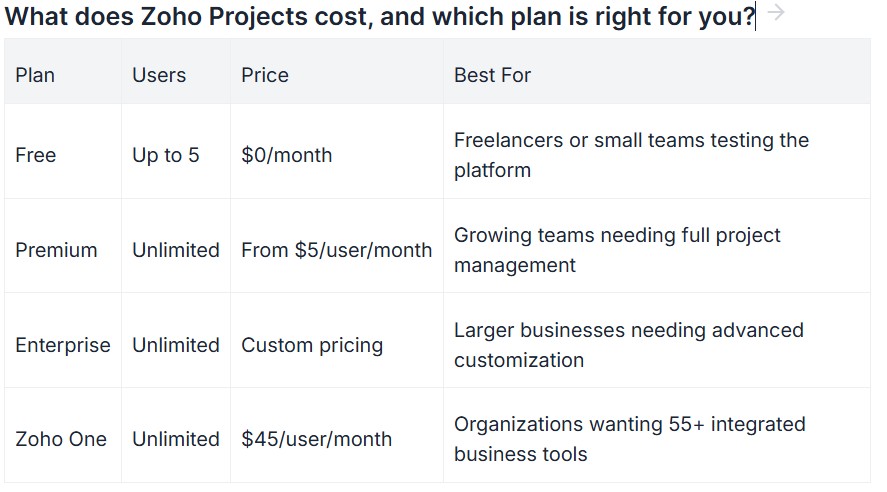
Choose the Free plan if you're a solo professional or a small team with straightforward project needs and fewer than five users.
Choose Premium or Enterprise if you need unlimited projects, budgeting tools, custom modules, or more advanced automation.
Choose Zoho One if your business relies on, or would benefit from a fully integrated suite of CRM, helpdesk, HR, finance, and project tools under one subscription. At $45 per user per month for 55+ applications, it represents strong value for growing organizations.
Zoho Projects gives professionals the structure to manage complex work, the tools to communicate without chaos, and the integrations to connect billing, support, and sales in one place. Whether you're managing client retainers, internal operations, or cross-functional teams, the platform scales with you.
Stop letting disorganized workflows cost you time and clients. Start a free Zoho Projects account today and see the difference a structured system makes.
👉 [Get Started with Zoho Projects, Free]
Is Zoho Projects suitable for small businesses and freelancers?
Yes. The free plan supports up to five users and includes core task and issue tracking features. Freelancers and small teams can manage client projects, set deadlines, and track basic progress without any upfront cost.
How does Zoho Projects handle client billing?
Zoho Projects includes built-in time tracking with timers and timesheet generation. Billable hours can be pushed directly into compatible finance tools, automating the invoicing process at project completion.
What is the difference between a Blueprint and a standard workflow rule in Zoho Projects?
A standard workflow rule triggers an automatic action when a condition is met, such as sending a notification when a task is overdue. A Blueprint controls how a task moves between stages, requiring specific criteria or approvals before progression. Blueprints are better suited for structured, client-facing processes.
Can Zoho Projects integrate with tools outside the Zoho ecosystem?
Yes. In addition to native integrations with Zoho CRM, Zoho Desk, and Zoho Books, Zoho Projects connects with third-party tools through Zapier and direct API access. Common integrations include Slack, Microsoft Teams, and Google Workspace.
What is Zoho One, and does it include Zoho Projects?
Zoho One is an all-in-one business suite that bundles 55+ Zoho applications, including Zoho Projects for $45 per user per month. It's designed for organizations that want a fully integrated tech stack without managing multiple vendor subscriptions.